TEFAL Bake Essential, Stand Mixer with Meat Mincer, 4.8 L Bowl, Baking Kit, 800 W
Bake Essential, Stand Mixer with Meat Mincer, 4.8 L Bowl, Baking Kit, 800 WEasy day-to-day baking!
The Tefal Bake Essential Stand Mixer was designed to meet all your essential baking needs, with an impressive 4.8 L capacity offering enough for the entire family. Flawlessly smooth and homogenous results are made effortless with a planetary movement that covers every inch of the bowl and easy-to-use controls for maximum convenience—from perfectly whipped egg whites and well-mixed batters to thick, heavy bread doughs and even burgers or meatballs, thanks to the included meat mincer.
A high-performance stand mixer large enough for any occasion—for perfect mixing every time
Delivering perfect results and generous enough to feed all your family and friends, Tefal Bake Essential has got you covered! This high-performance stand mixer promises perfect mixing in a large 4.8 L stainless steel bowl. From creams and meringues to pastry and bread doughs, its planetary movement and 800 W of power ensure smooth, homogenous mixing, while the included meat mincer even serves up meat balls, burger patties and more.
Essentials
Large capacity
The 4.8 L stainless steel bowl delivers generous meals for the whole family—every day.
Flawless results
Exceptionally smooth and homogenous results are guaranteed thanks to the planetary movement that covers every inch of the bowl.
Perfect whipping
Enjoy light and airy whipping results for ingredients like egg whites, creams and meringues (for up to 800 ml of cream).
Perfect beating
Achieve well-mixed, homogenous beating for ingredients like pastry dough, cakes and cookies (produces up to 1.8 kg of mixture).
Perfect kneading
A robust metal dough hook tackles heavy mixtures like breads, brioches and shortcrust pastries (for up to 500 g of flour).
High-performance mixing
A powerful 800 W motor and full pastry kit put a wide variety of recipes at your fingertips, for fast and flawless results.
Meat mincer attachment
The meat mincer includes two stainless steel grids for different preparation types—for delicious homemade meatballs, burgers and more.
Simple controls
6 easy-to-use speeds and a pulse function cover all your mixing needs.
Your account, to be created from the app, allows you to benefit from additional services related to the interaction of your app with your product: • Find the recipes saved in your notebooks and favourites directly on the robot's screen. • Follow remotely the progress of the recipe on your product and receive recipe notifications. • Display on your product a recipe that you have selected in the application.
Even if your product doesn't need a very fast WiFi connection to work, the received WiFi signal must still be stable. If the screen displays a connectivity error, you can move the product closer to your box or add a WiFi repeater (see FAQ 'I don't have WiFi access in my kitchen').
If your product loses the WiFi connection during a recipe, you will be able to finish your recipe without any inconvenience. However, the videos of that recipe will no longer be accessible until the connection is re-established.
If the WiFi connection is interrupted during an update, this cannot be completed. Your product will be able to reboot to its current version and this update will be rescheduled the next time you start it.
If your smartphone loses internet connection (WiFi or 4G) during a recipe it will have no impact on your product which will be able to execute the recipe without any problem. You will simply no longer be able to follow the progress of the recipe remotely on your smartphone and you will no longer receive notifications about the end of a step or the addition of an ingredient.
Your product can only be associated with one account. However, any application that is connected to this account can interact with this product. If you have a tablet and a smartphone, or if other members of your household want to interact with your product, they can simply connect their application using your account.
As soon as an update is available, your product when it connects to the WiFi will suggest you to do the update.
Some updates are priorities for security reasons and you will need to perform them before you can use your product. Others may be delayed. You can then perform them now or later by going to your product's settings.
If an update fails, you can download it again. If despite several attempts you are unable to install it, move the product closer to your box, the connection from your kitchen may be too weak to download it. If the update fails even close to your box, please contact our customer service.
If your product is associated with your user account, you will be able to follow the progress of your recipe on your application. You will also receive end-of-stage or alert notifications. If you do not receive these notifications, please enable them in your iOS or Android settings.
To remotely send a recipe from your application to your product, simply open a recipe and click on the icon with your product. If your product is on standby, it will open on your product as soon as it connects to Wifi. If the product is running, it will be displayed in a few seconds if your product is not already making another recipe.
Place your device on a flat, stable surface. To obtain an optimal connection between your device and your box, it is recommended to position your device in a place where the Wifi signal received from your box is strong. You can test the connection by positioning your smartphone at the location of your product to see if the WiFi signal received at that location is strong enough. If the connection is interrupted (connection symbol crossed out), please bring your device and your box closer together to reestablish the connection. The presence of the fixed connection indicator (application or product) ensures that your devices are connected.
Before using your appliance for the first time, wash all parts of the accessories in warm soapy water (see section on cleaning in your instruction manual). Rinse and dry. Place the motor unit on a flat, clean and dry surface. Plug in your appliance.
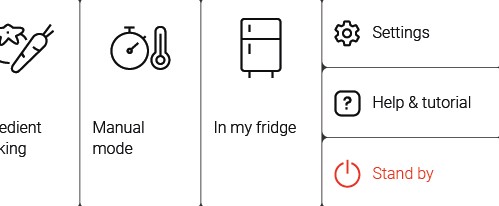
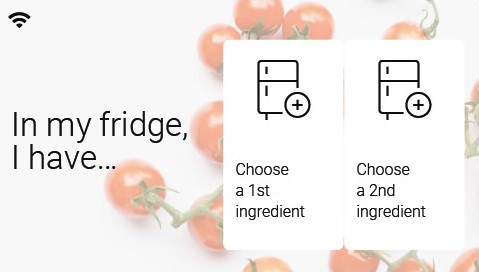
Thanks to the function "In my fridge" you can indicate the ingredients that you have at your disposal and we will suggest suitable recipes.
• You can access this feature from the home screen. • Add one or two ingredients by typing their name in the search bar and selecting it from the suggestions. • You can then enter the weight of the added ingredients so that we can offer you recipes for those quantities.
Your product is not connected to the WiFi (via the modem or via a mobile phone). Therefore, you can only access the 250 recipes contained in your product. We advise you to check that WiFi is activated on your modem/phone and to get closer to your modem/phone. We remind you that your product cannot connect to a 5GHz WiFi network, a WiFi network with a password containing special characters, as well as open WiFi networks (which do not require a password).
Your product is connected to the WiFi (via modem, mobile phone,...), but not connected to the database. Therefore, you can only access the 250 recipes contained in your product.
Your product is connected to the WiFi (via modem, mobile phone,...) and to the database. As a result, you can access more than 1,500 recipes.
A Kitchen Machine works differently from a Food Processor as the tools used for mixing are suspended from an overhead arm into the food, whereas with a Food Processor, the mixing tools operate from underneath the ingredients. A Kitchen Machine is primarily for mixing dough and cake mixtures. A Food Processor can do these jobs but not with the efficiency of a kitchen machine. If you are planning on making cakes you should consider how much you will be doing this job. If it is going to be a common occurrence then a Kitchen Machine would be a better choice. It is worth taking note of the fact that a Food Processor is far smaller than a Kitchen Machine.

 The product is not connected.
 The product is connecting.
 The product is connected.